




Our data management platform runs across a dozen of interconnected repositories — frontend, GraphQL server, multiple backend microservices, infrastructure controllers, deployment charts, and shared libraries. About a year ago, I started experimenting with AI coding agents — first with Cursor, then Claude Code — not to generate boilerplate, but to see whether an agent could become a genuine reasoning partner for navigating this complexity.
This post is about what I learned, what actually worked, and the hard problems we're still solving.
The Gap Isn't in the Tools — It's in How We Use Them
AI coding agents have become genuinely capable. Tools like Claude Code, Cursor, and Augment can navigate entire codebases, run tests, create merge requests, and reason across files. The technology isn't the bottleneck anymore.
But most teams still treat them like guided tools. Engineers break down a task themselves, then ask the agent to add an endpoint, scaffold a component, or write a test for a function they've already designed. The human does the reasoning; the agent does the typing. It's faster, but it's not a fundamentally different way of working.
The hardest problems in our day-to-day engineering work aren't about writing code faster. They're about understanding how a change in one service ripples through five others. They're about debugging a production incident at 2 AM when the alert points to a symptom three services away from the root cause. They're about onboarding onto a service you haven't touched in months and needing to understand its current state — not what the wiki said six months ago.
For these problems, even a powerful agent is limited if it only has the context of a single repository and a ticket description. We needed to change what the agent knows, not what it can do.
The Core Idea: Treat the Codebase as Documentation
The idea that code should be its own documentation isn't new — Cyrille Martraire's Living Documentation made this case years ago. What's changed is that AI agents can now actually read and reason about an entire codebase at scale.
The insight that shaped our approach: code is the most accurate and up-to-date description of how a system actually works. Documentation drifts. Wikis go stale. But the code reflects reality.
So instead of asking "how do we write better docs for the agent?", we asked: "what if we gave the agent the codebase itself as its primary source of truth?"
We built what we call an agentic workspace — a single repository that connects all 14 of our project repositories as Git submodules. When an agent starts working, it doesn't just see the file you're editing. It can read the React frontend, trace a GraphQL query through the gateway, follow it into the Kotlin service that handles the business logic, and understand the Helm chart that deploys the whole thing.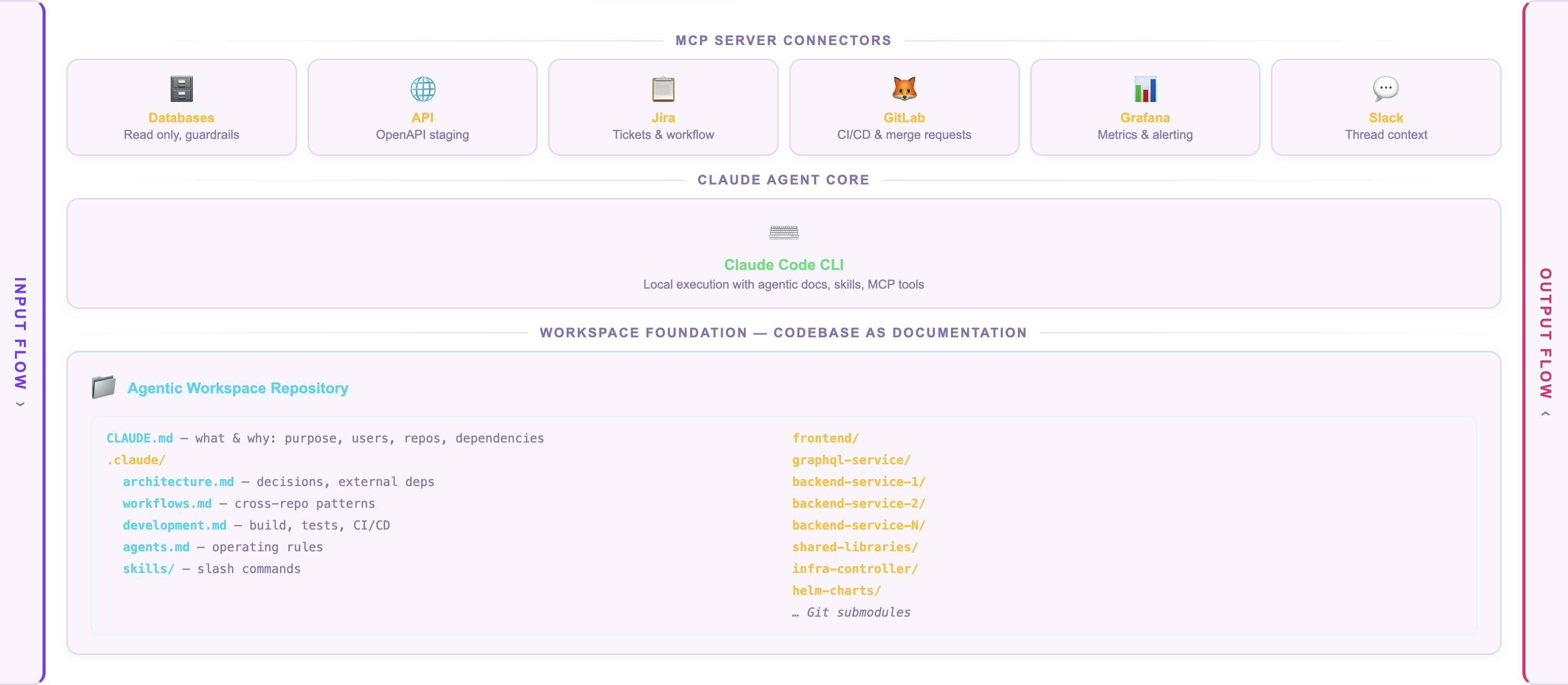
The codebase becomes the documentation. The agent reads it the way a engineer would — following data flows, reading type definitions, understanding how services call each other.
What Code Alone Can't Tell You
Of course, code doesn't capture everything. It doesn't explain why the team split a monolith into six services two years ago. It doesn't tell you that one of the services is effectively in maintenance mode. It doesn't describe the deployment pipeline or the on-call runbooks.
This is where the second layer comes in. Alongside the code, we maintain structured markdown files that describe the relationships, decisions, and context that aren't visible in the source:
The workspace documentation starts with what the project is and what it's for — the product's purpose, user groups, and functional areas, so the agent understands why the code exists, not just how it's structured. It describes which repositories are inside and how they connect — the dependency graph between services, shared libraries, and client modules, including the order in which changes need to be merged across repos. It specifies how we expect the agent to operate — naming conventions, commit message formats, which files are generated and should never be edited, which design system components to prefer, and how to coordinate cross-repo changes like GraphQL schema migrations.
Critically, it captures what's not readable from the codebase — external dependencies on third-party services, the reasoning behind architectural decisions (including ones we'd make differently today), environment configurations, the deployment process, CI/CD pipeline structure, and escalation paths to other teams. And it includes operational context — how to run tests, what quality gates exist, how staging and production deployments work, and what tools are available through MCP integrations.
We treat setting up a workspace like onboarding a new team member. The process includes a structured interview — around 45 questions — that captures the tribal knowledge living in engineers' heads: team structure, external dependencies, known quirks, things the code doesn't say.
What This Looks Like in Practice
Here's a concrete example. An engineer picks up a Jira ticket that requires a change to how our cloud management portal displays environment configuration.
In a traditional workflow, the engineer would need to:
- Understand the React component structure in the frontend
- Trace the GraphQL query in the gateway to find which resolver fetches the data
- Read the Kotlin service that serves the configuration API
- Check whether any shared library changes are needed
- Understand the merge order (shared libraries first, then services, then gateway, then frontend)
With the agentic workspace, the agent already has that context. When I ask it about this ticket, it can tell me: "This configuration is served by the backend config service, exposed through a REST endpoint, federated into the GraphQL schema in the API gateway, and rendered by a specific frontend component. A shared client library is involved, so if the API contract changes, you'll need to merge the backend service first, bump the client library version in the downstream consumers, then update the gateway resolver, then the frontend." That's not a generic answer — it's reading the actual dependency graph and merge-order rules documented in the workspace.
With the agentic workspace, the agent already has that context. When I ask it about this ticket, it can tell me: "This configuration is served by the backend config service, exposed through a REST endpoint, federated into the GraphQL schema in the API gateway, and rendered by a specific frontend component. A shared client library is involved, so if the API contract changes, you'll need to merge the backend service first, bump the client library version in the downstream consumers, then update the gateway resolver, then the frontend." That's not a generic answer — it's reading the actual dependency graph and merge-order rules documented in the workspace.
Connecting Agents to the Rest of the Stack
Code context alone isn't enough for the really interesting use cases — incident response, production debugging, and operational troubleshooting.
This is where MCP (Model Context Protocol) comes in. MCP is a standard that lets AI agents connect to external tools through structured interfaces. Think of it as giving the agent hands — it can read code, but MCP lets it also query Grafana dashboards, inspect Kubernetes cluster state, and interact with internal service APIs.
In our setup, the agent can:
- Receive a PagerDuty alert and analyze it against the codebase and operational runbooks
- Query Grafana to understand the current state of the system
- Inspect Kubernetes pod status and logs
- Cross-reference error patterns with known issues documented in the workspace
The key is that the agent doesn't just call these tools blindly. Because it has the full codebase context, it can reason about what to check. A spike in error rates on one service triggers the agent to trace the dependency chain and check the upstream services that feed it data. It knows what to look for because it understands the architecture.
What We Got Wrong (and What We're Still Figuring Out)
Transparency matters, so here's what hasn't been straightforward.
Defining the right permission boundaries is an open industry problem. When agents operate autonomously — say, monitoring alerts in a shared channel or preparing fixes across repositories — you need to think carefully about what they should be allowed to do independently versus with human approval. What level of access does an agent need? How do you distinguish an agent's actions from a human's in audit logs? How do you scope permissions so an agent can be useful without being overpowered? We're working through these questions with our security team, and we don't think anyone in the industry has fully solved them yet. In the meantime, we run all our agents in a copilot mode — an engineer reviews and moderates every crucial step: inputs, intermediate results, and outputs.
Scaling across teams creates coordination problems. When different teams started experimenting independently, we immediately ran into questions: should tool integrations be built as MCP servers or native Slack integrations? Should MCP servers run locally on each developer's machine or in a shared environment? How do you manage authentication tokens across dozens of tools? None of these have obvious answers.
Context windows have limits. Fourteen repositories plus documentation plus transcripts is a lot of context. We're still figuring out whether a single large workspace works at scale, or whether a network of specialized sub-agents with smaller contexts — one per project area — is more effective. Early experiments suggest the distributed approach may be better: an orchestrator agent that knows which project-specific agents to ask, rather than one agent that tries to know everything.
Keeping documentation current is a real challenge. The workspace documentation is only useful if it reflects reality. When a team changes a dependency or refactors a service boundary, the workspace docs need to be updated. We're exploring ways to automate this — having agents detect drift between the documentation and the actual codebase — but it's not solved yet.
Where We Are Now
Recently we formed three virtual teams to experiment with applying this approach to real engineering workflows:
- Incident response — can an agent triage a PagerDuty alert, analyze the system state, and suggest (or even implement) a fix before a human gets to the laptop?
- Bug triage and fixing — can an agent reproduce a reported bug by understanding the full system context, identify the root cause, and propose a fix across the right repositories?
- CVE patching — can an agent scan for vulnerable dependencies, understand the impact across services, and prepare coordinated upgrade PRs?
These aren't theoretical exercises. Each team is running experiments in real engineering environments, with real codebases and real incidents. The idea is to learn what works in practice and extract repeatable patterns from those experiences.
The approach has been in development for about a year, but it's only recently — with the maturity of tools like Claude Code and the MCP ecosystem — that it's become practical enough for broader team adoption. Our neighbor teams have already started contributing to the workspace documentation organically, which is a good sign that the approach has legs beyond a single person's experiment.
What I'd Tell Teams Starting This Journey
If you're considering something similar, here's what I wish I'd known earlier:
Start with the documentation, not the tools. The agent is only as useful as the context you give it. Spend time writing good architecture docs, dependency graphs, and development guides before you worry about which AI tool to use. This documentation will help your human engineers too.
Treat workspace setup like onboarding. Ask yourself: if a competent senior engineer joined the team today, what would they need to know that isn't obvious from the code? Write that down. That's your agent's starting context.
Be honest about what the agent can and can't do. Agents are excellent at reading large codebases, following data flows, and applying established patterns across files. They're poor at making architectural judgment calls, understanding organizational politics, and knowing when a "quick fix" will create tech debt. Keep humans in the loop for decisions.
Don't skip the security conversation. It's easy to get excited about what agents can do and forget to ask what they should be allowed to do. Have the security discussion early, even if the answers aren't clear yet.
This is our first public write-up on this work, and the experiments are still evolving. If you're exploring similar approaches — or if you have ideas about the hard problems we've described — we'd love to hear from you. We also run regular engineering meetups where we discuss topics like this — join our community if you're interested.
Gennadii Mareichev is a Staff Engineer at Ataccama, AI enthusiast and entrepreneur.